
IPD management software from admission to discharge
Included in: OPD + IPD · Full Suite See pricing
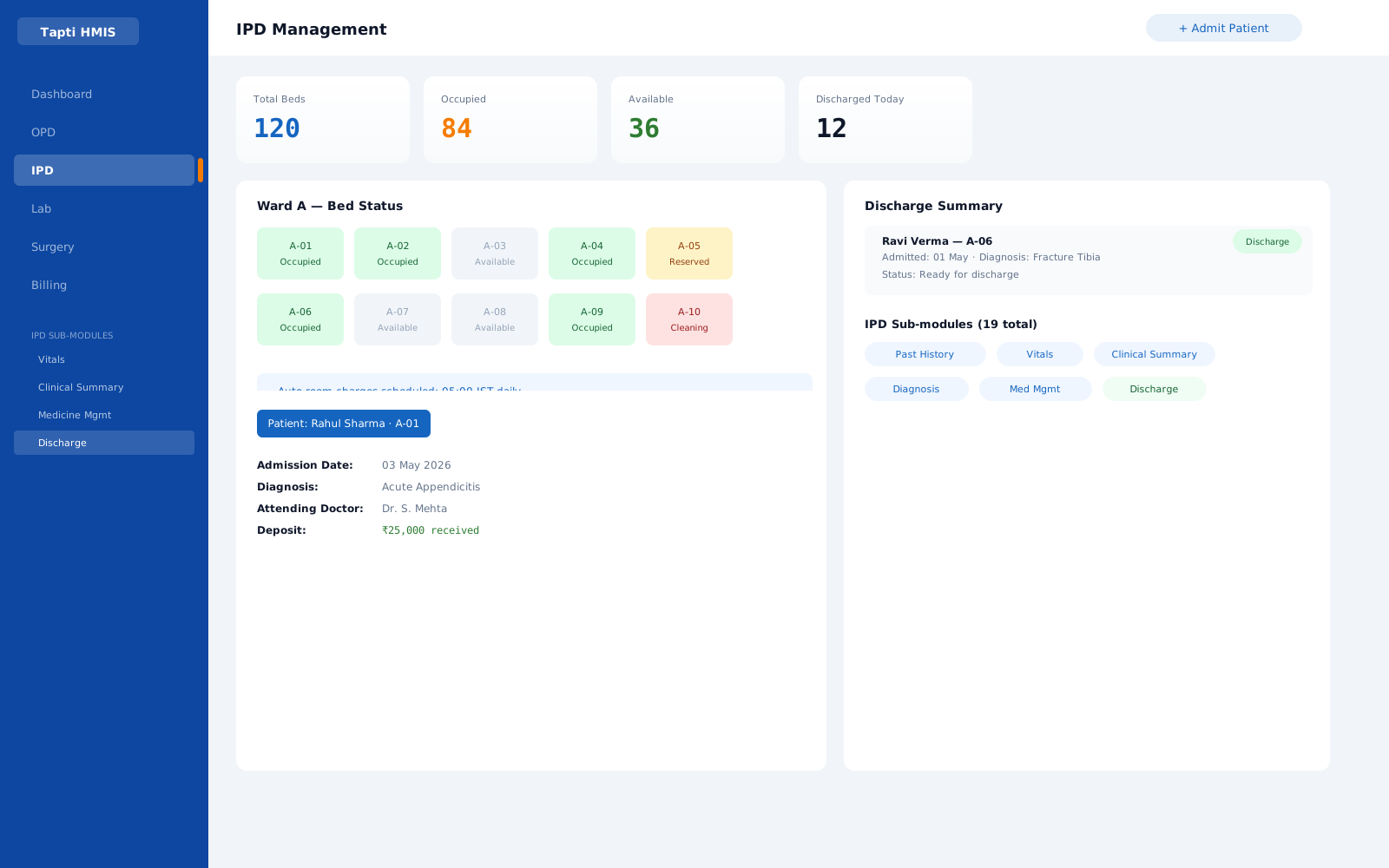
* Sample data, illustrative
Why IPD goes wrong on paper
Paper works on a ward until it has to add up. Nursing notes sit in one file, the doctor's round in another, medicines on a chart at the foot of the bed and charges in a ledger at the billing desk. Each record is fine on its own. The trouble starts at the joins.
A patient shifts from general ward to a private room on day three, and the room rate on the bill never changes. A night passes and nobody posts the bed charge. A deposit is collected at admission and forgotten at discharge. The insurer asks for the clinical summary and someone has to piece it together from loose sheets. Every one of these gaps costs money, time or both, and most hospitals only find them when a patient disputes the final bill.
Good IPD management software closes the joins. Admission, bed, clinical record, deposit, daily charges, insurance and discharge all hang off the same admission, so a change in one place is reflected everywhere else.
What to look for in IPD software
Use this list when you compare any IPD module. It covers the places inpatient revenue and records usually slip.
- Bed and room assignment at admissionThe patient should be admitted straight into a room category and bed, so charges start from the right rate on day one.
- Bed shifting that moves the charges tooA transfer must be recorded against the stay, so the bill follows the patient from bed to bed.
- Room charges that post themselvesIf someone has to remember to add each bed-day, some will be missed. Look for automatic daily charging.
- Deposits visible on the running billDeposits should carry receipts and sit against the IPD invoice, not in a separate register.
- Clinical records the ward actually keepsA fixed template forces the wrong fields on every specialty. Configurable records fit maternity, dialysis and surgical wards alike.
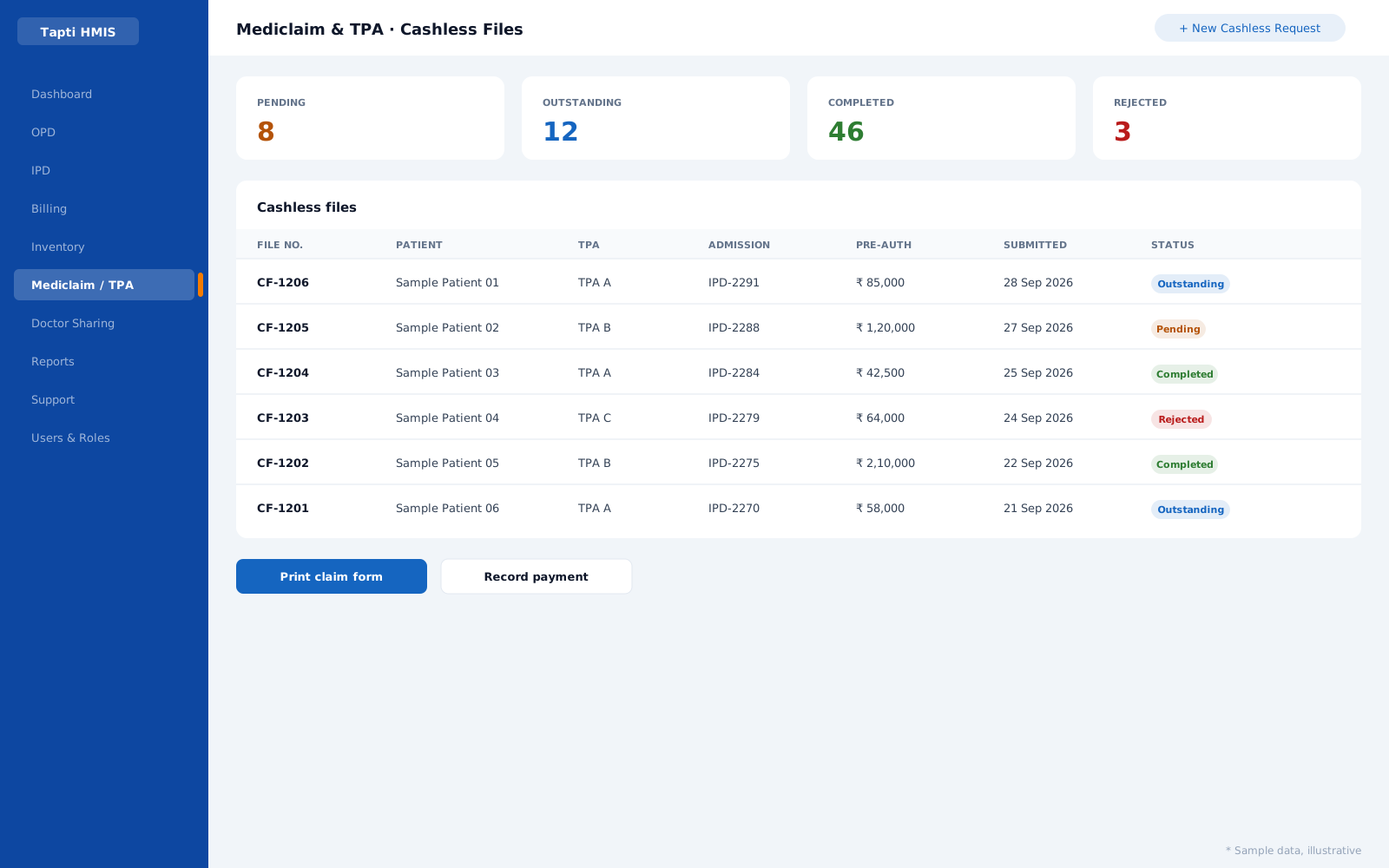
- Mediclaim tied to the admissionCashless requests and claim data should live with the stay and link to the IPD invoice.
- A discharge card that writes itselfDischarge condition, advice and diet instructions should roll up from the record, not be typed again.
How Tapti runs the inpatient stay
One admission, one file, one running bill. Here is the path a patient takes through Tapti HMIS.
- 01
Admit into a room and bed
The patient is admitted with a room category and bed assigned. The IPD dashboard shows every admitted patient at a glance.
- 02
Collect the deposit
Deposits are collected with a deposit receipt and tracked against the running IPD bill. An indoor deposit report shows what is currently held.
- 03
Record the ward's care
Doctor visits, vitals, medication, investigations and specialty records go into configurable IPD sub-modules, so each ward records what it actually does.
- 04
Stop counting bed-days by hand
Each day at 5 AM IST, the system posts the day's room and bed charge to every open admission on its own. If a day was skipped, it is caught up when the system next starts.
- 05
Shift beds without losing the trail
Room shifting and bed transfers are recorded against the stay, so history and charges follow the patient.
- 06
Discharge in one step
Discharge condition, remarks, advice and diet instructions roll up into a discharge card, printed in one step, while the IPD invoice moves from Pending to Final.
On a tablet, at the bedside
Tapti HMIS supports tablet use, so the ward record can be opened where the patient is instead of at the nurses' station.
Doctors on ward rounds
Open the patient's IPD file on a tablet during rounds, and record the visit, notes and orders while standing at the bed instead of rewriting them later at a desk.
IPD moduleNurses at the bedside
Nurses can use Tapti HMIS on a tablet to work with the ward's records, such as vitals and medication, at the point of care.
IPD moduleOne record, any screen
A tablet shows the same admission, the same bed and the same running bill as the desktop at the billing desk, so there is no second copy to reconcile.
Same role-based access
A tablet login follows the same permissions as any other screen. A nurse sees what a nurse is allowed to see, down to View, Add, Edit and Delete per form.
User Management module
Where IPD meets the rest of the hospital
Inpatient care touches billing, insurance and the operation theatre. In Tapti they share the same admission.
IPD billing
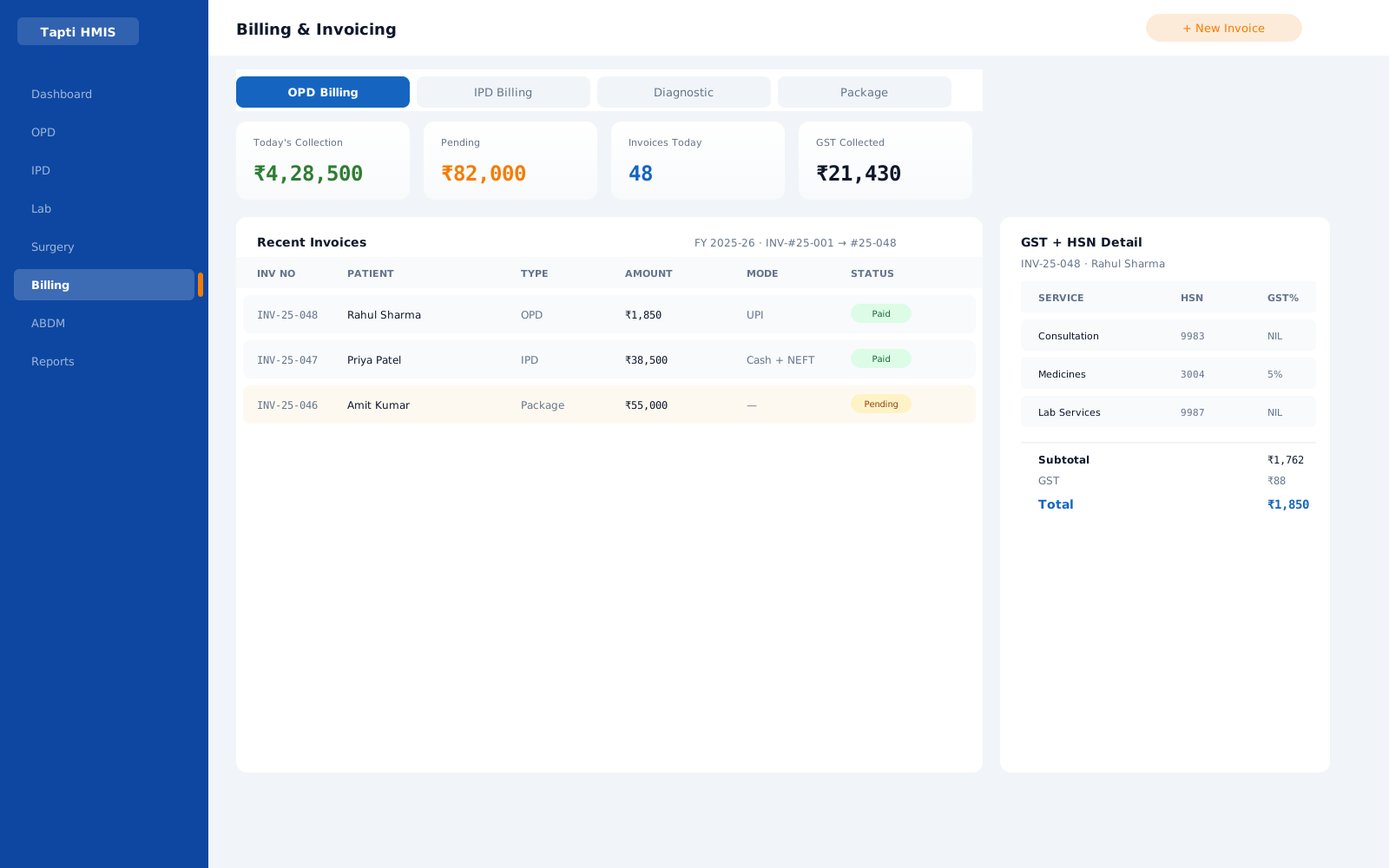
Inpatient bills track multiple statuses such as Pending and Final, with deposits and mediclaim linked to the invoice. IPD bill summary reports give management the consolidated view.
Billing moduleMediclaim and TPA
A cashless request is created per IPD admission, with pre-authorisation, submission, payment and rejection tracked, and claim forms printed from the case.
Mediclaim & TPA moduleSurgery and OT
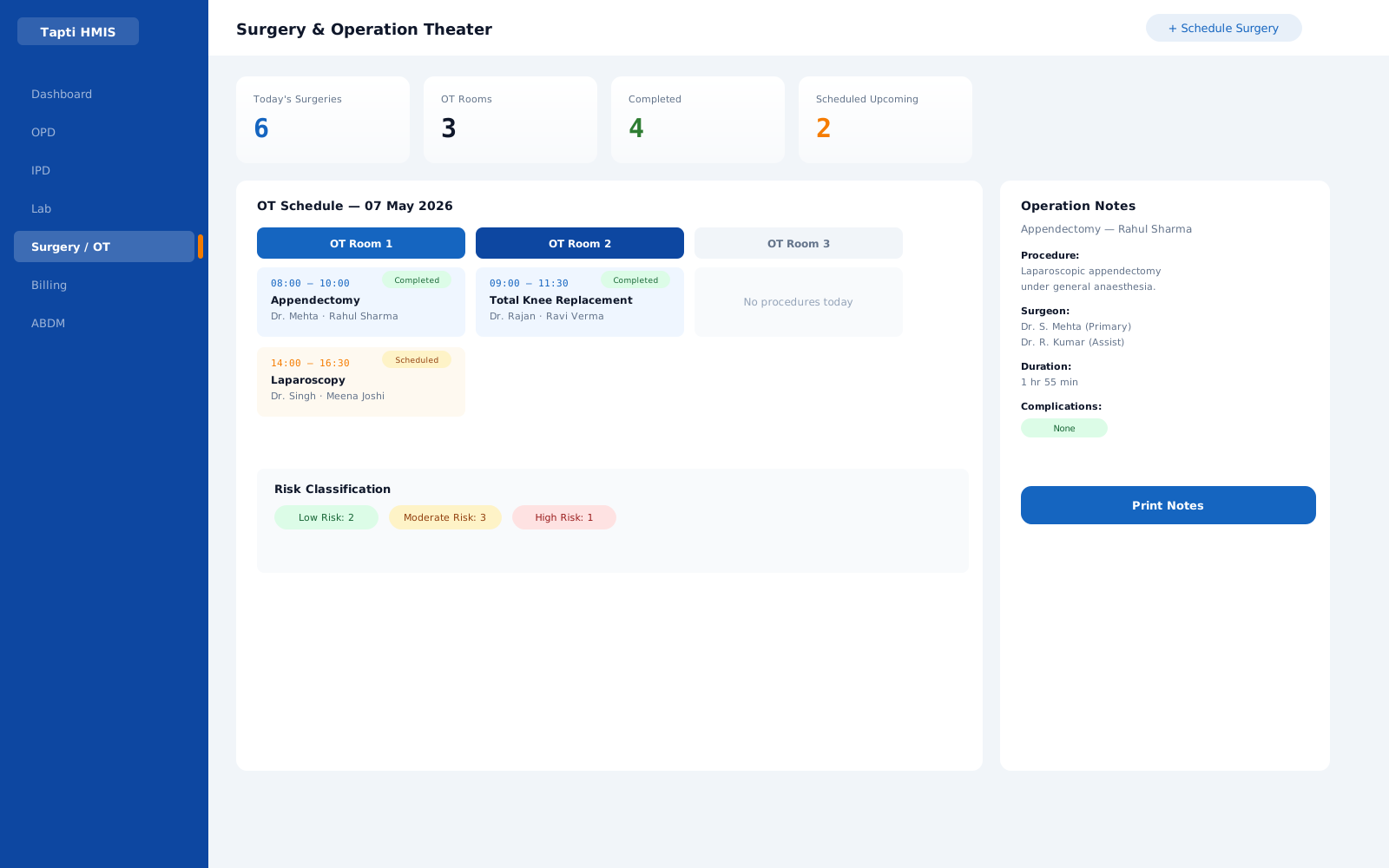
Operation scheduling, the surgical team and operation notes sit alongside the admission, and surgical notes are part of the IPD record.
Surgery & OT moduleDefault charges per room category
Configure the default IPD charges for each room category once, so every admission starts from the right tariff.
Documents on the file
Upload images and documents against the IPD record, so scans and reports travel with the patient's stay.
Role-based access
Nurses, doctors and billing staff see only the screens their role allows, down to View, Add, Edit and Delete per form.
User Management module
Built for Indian wards
Indian hospitals run mixed wards: a maternity floor next to a dialysis unit, general beds beside private rooms, cash patients beside cashless ones. Tapti's IPD records are configurable, so the obstetrics team uses delivery records while the nephrology team uses detailed dialysis forms, and both share one admission and billing flow.
IPD is included in the OPD + IPD package from ₹12,000 a year and in the Full Suite from ₹15,000 a year, for hospitals up to 15 beds. Above 15 beds, we quote to your setup.
Feature detail
All 19 IPD sub-modules, listed
Vitals, clinical summary, doctor visits, medicine management, adverse drug reactions, blood transfusion, dialysis, wound care and more. The IPD module page lists every sub-module and what it records.
Common questions
What does IPD management software do?
It runs the inpatient stay: admission with room and bed, clinical records on the ward, deposits, daily room charges, bed transfers, insurance and discharge. In Tapti HMIS all of it hangs off one admission and one running bill.
How is IPD software different from a billing system?
A billing system records what was charged. IPD software records the stay itself: admission, bed, ward care, deposits and discharge. The bill is built from that record, so bed-days, deposits and insurance are already on it when the patient leaves.
What happens to charges when a patient changes bed?
Room shifting and bed transfers are recorded against the admission, so the patient's history and charges follow them to the new bed.
Can doctors and nurses use Tapti HMIS on a tablet?
Yes. Tapti HMIS supports tablet use, so doctors and nurses can work with the IPD record at the bedside or on ward rounds. Tablet access follows the same role-based permissions as every other screen.
Can each ward record different clinical data?
Yes. Tapti's IPD sub-modules are configurable, so a maternity ward can use delivery records while a dialysis unit uses detailed dialysis forms, and both share the same admission and billing flow.
Can we move our existing patients into the new system?
Yes. Patient bulk import from Excel is built in, and the Tapti team supports a migration plan for billing history and master data.
Run your hospital on one platform.
See Tapti HMIS live in a 30-minute walkthrough, tailored to your hospital's departments, beds, and workflows.